
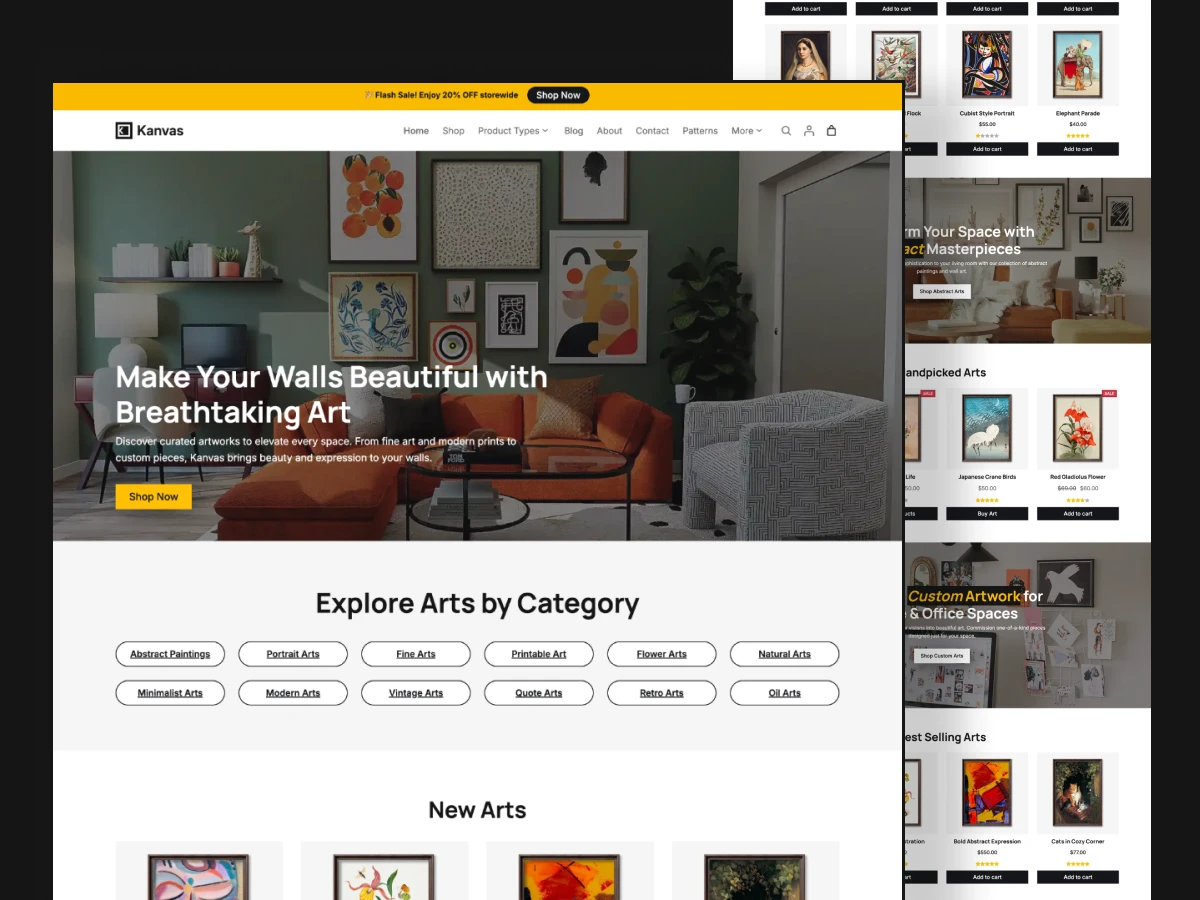
Kanvas Arts – A Creative WordPress Website for Artists & Art Stores
Give your artwork the online presence it deserves with Kanvas Arts, a beautifully designed WordPress website demo created for artists, illustrators, designers, and creative entrepreneurs. Whether you sell original paintings, handmade creations, digital illustrations, or artistic prints, Kanvas provides an elegant foundation for presenting your work and building an online art business.
Designed around the modern WordPress Block Editor and WooCommerce, this website demo combines a visually engaging presentation with practical eCommerce functionality. Its thoughtfully arranged layouts help visitors discover your collections, explore individual products, learn about your creative journey, and purchase their favorite pieces.
With ready-made website pages, customizable block patterns, and an easy demo import process, you can establish your own creative storefront without having to design every section from scratch.
A Beautiful Online Home for Your Artwor
Your website should reflect the creativity and personality behind your work. Kanvas Arts provides a refined visual experience that allows artwork to take center stage while keeping navigation and shopping straightforward.
From large artwork displays to organized product collections, the design makes it easy to build an online destination that feels professional and memorable.
Use Kanvas to create a website for:
- Independent artists showcasing original paintings and illustrations.
- Digital artists selling downloadable artwork and creative assets.
- Art studios presenting collections and creative projects.
- Illustrators building an online portfolio and product store.
- Handmade businesses selling artistic and handcrafted products.
- Creative brands looking for a distinctive WooCommerce storefront.
Whether you’re launching your first online shop or refreshing an existing creative business, Kanvas gives you a flexible starting point.
Explore the Kanvas Website Design
Kanvas includes carefully designed layouts for the essential sections of a modern art and creative store. Each page serves a different purpose, helping you introduce your brand, present your products, and connect with potential customers.
Homepage – Make a Memorable First Impression
Welcome visitors with an engaging homepage that introduces your creative brand and highlights your most important collections. Feature selected artwork, promotional sections, product categories, and compelling calls to action.
The homepage provides a flexible starting point for telling your brand story and directing visitors toward your products.
Shop Page – Organize and Showcase Your Collections
Present your artwork in a well-structured online catalog. Visitors can explore different product categories, browse collections, and discover pieces that match their interests.
The WooCommerce-powered shopping experience makes it possible to manage your products and build a complete online store.
Single Product Page – Put Every Artwork in the Spotlight
Give each creation its own dedicated presentation. Display product photography, descriptions, pricing, variations, and purchasing options in an organized layout.
Whether you’re selling an original painting, a digital illustration, or a limited-edition print, the product page helps customers understand what makes each item special.
Portfolio and Creative Presentation
Build a stronger connection with your audience by showcasing selected projects, artistic collections, and creative work.
Use your website to communicate your style, highlight your achievements, and demonstrate the quality of your work.
About Page – Tell Your Creative Story
Introduce the person or team behind the artwork. Share your background, creative philosophy, inspiration, and the story behind your business.
An engaging About page helps visitors understand your brand and build confidence in purchasing from your store.
Blog Page – Share Ideas and Grow Your Audience
Publish articles about your creative process, new collections, artistic inspiration, tutorials, and industry updates.
A regularly updated blog also creates opportunities to target relevant search queries and attract visitors interested in your creative niche.
Contact Page – Make It Easy to Connect
Give visitors a convenient way to contact you about artwork, commissions, collaborations, custom orders, or general inquiries.
A dedicated contact page helps establish a professional communication channel with your audience.
Customize Your Website with the WordPress Site Editor
Kanvas is built around the WordPress Block Editor, giving you a visual way to manage your website’s content and appearance.
You can modify your website using the familiar WordPress editing experience rather than depending on a separate page-building platform.
Personalize important design elements, including:
- Typography: Choose font styles and text treatments that reflect your brand.
- Colors: Adjust global color settings to create a consistent visual identity.
- Layouts: Modify page sections and content arrangements to suit your needs.
- Headers and Footers: Update your website navigation, branding, and supporting information.
- Block Patterns: Reuse and adapt pre-designed sections throughout your website.
- Templates: Customize the appearance of different website pages.
These options make it easier to evolve your website as your creative business grows.
65+ Ready-to-Use WordPress Block Patterns
Building a website section by section can take considerable time. Kanvas includes more than 65 pre-designed block patterns that provide useful starting points for creating and customizing your pages.
The collection covers different website sections and layouts, including homepage content, shop presentations, product displays, portfolio sections, and blog layouts.
Instead of starting with an empty editor, you can work with existing design structures and adapt them to your content.
This makes Kanvas a practical choice for creators who want greater control over their website without designing every element from the beginning.
WooCommerce Integration for Selling Your Creations
A creative website can do more than display artwork. With WooCommerce integration, Kanvas can become a fully functional online store.
Set up your product catalog, organize collections, configure product pricing, and manage customer purchases through the WooCommerce ecosystem.
You can use your website to sell:
- Original artwork and paintings.
- Digital illustrations and downloadable files.
- Art prints and posters.
- Handmade products and crafts.
- Creative merchandise.
- Other physical and digital products.
WooCommerce also provides essential store functionality, including shopping carts, checkout, product management, and customer account features.
This combination of creative presentation and eCommerce functionality gives your business room to grow.
Get Started Faster with One-Click Demo Import
Starting a new website doesn’t have to mean building everything manually.
Kanvas includes a one-click demo import option that helps you bring the demo website structure, sample content, products, and settings into your WordPress installation.
Once the import is complete, you can replace the demonstration content with your own artwork, images, branding, and product information.
A simple starting process:
- Install and activate the Kanvas theme.
- Follow the setup instructions to access the demo importer.
- Import the Kanvas demo website.
- Explore the imported pages and website layouts.
- Replace sample content with your own materials.
- Customize the design using the WordPress Site Editor.
- Add your products and configure your WooCommerce store.
You can then publish your website with a design that reflects your own creative identity.
A Responsive Design for Every Screen
Your audience may discover your artwork through a desktop computer, tablet, or mobile phone. Kanvas is designed to provide a responsive browsing experience across different screen sizes.
Visitors can explore your collections, view product details, and navigate your website on their preferred devices.
A consistent mobile experience is particularly important for creative businesses, where product imagery and visual presentation play an important role in purchasing decisions.
Why Choose Kanvas for Your Creative Website?
Kanvas brings together the essential elements needed to establish a professional online presence for an art-focused business.
Creative-first presentation: Give your artwork a dedicated space with visually focused website layouts.
Flexible WordPress editing: Manage content and customize your website through the native block editing experience.
Extensive design patterns: Start with more than 65 ready-made block patterns for different website sections.
Online selling capabilities: Use WooCommerce to showcase products and manage online transactions.
Faster website setup: Import the demo to establish your initial website structure.
Multiple page layouts: Build a complete website with homepage, shop, product, portfolio, blog, about, and contact sections.
Responsive experience: Provide visitors with a website that adapts to different devices.
Room to grow: Expand your website with additional content, products, collections, and creative projects.
Who Should Use the Kanvas Website Demo?
Kanvas is suitable for individuals and businesses that want to combine creative presentation with online selling.
- Artists and Painters: Showcase original artwork and sell paintings through an online store.
- Digital Illustrators: Present digital creations, downloadable designs, and illustration collections.
- Graphic Designers: Build a creative portfolio and offer design-related products.
- Art Studios: Introduce your studio, display collections, and connect with customers.
- Handmade Businesses: Present handcrafted products and artistic creations.
- Creative Entrepreneurs: Establish a professional website for a growing art or design business.
If your business revolves around creativity, visual storytelling, or selling artistic products, Kanvas offers a useful foundation for your website.
Build Your Creative Website with Kanvas
Your artwork deserves more than a basic online catalog. It deserves a website that communicates your creative identity, presents your collections beautifully, and makes it easy for customers to explore and purchase your work.
With its collection of ready-made layouts, extensive block patterns, WordPress Site Editor customization, and WooCommerce capabilities, Kanvas Arts provides a practical starting point for building an art-focused online business.
Explore the live demo, discover its website layouts, and start creating a WordPress website that brings your creative vision to life.
Frequently Asked Questions About Kanvas
Kanvas is a WordPress block theme designed for artists, illustrators, designers, and creative businesses. It provides website layouts and WooCommerce functionality for showcasing artwork and selling physical or digital products.
Yes. Kanvas integrates with WooCommerce, allowing you to create product catalogs, display artwork, manage shopping carts, and accept online orders.
Yes. Kanvas uses the WordPress Block Editor and supports Full Site Editing, allowing you to customize templates, website sections, headers, footers, typography, and global styles.
Yes. Kanvas includes a demo import feature that helps you set up the sample website structure, pages, products, and settings.
Kanvas includes more than 65 ready-to-use WordPress block patterns for creating different website sections and layouts.
Yes. You can use WooCommerce to offer downloadable artwork, digital illustrations, and other digital products alongside physical merchandise.
Yes. You can make many visual changes using the native WordPress Site Editor, including colors, typography, layouts, templates, and block patterns.
Yes. Kanvas features responsive layouts designed to adapt to desktop computers, tablets, and mobile devices.